
Need help with your listing or account?
Need help managing your online directory listings? Explore our helpful video tutorials and step-by-step written instructions to learn how to update your listings, make changes to your account, and manage your subscriptions with ease.
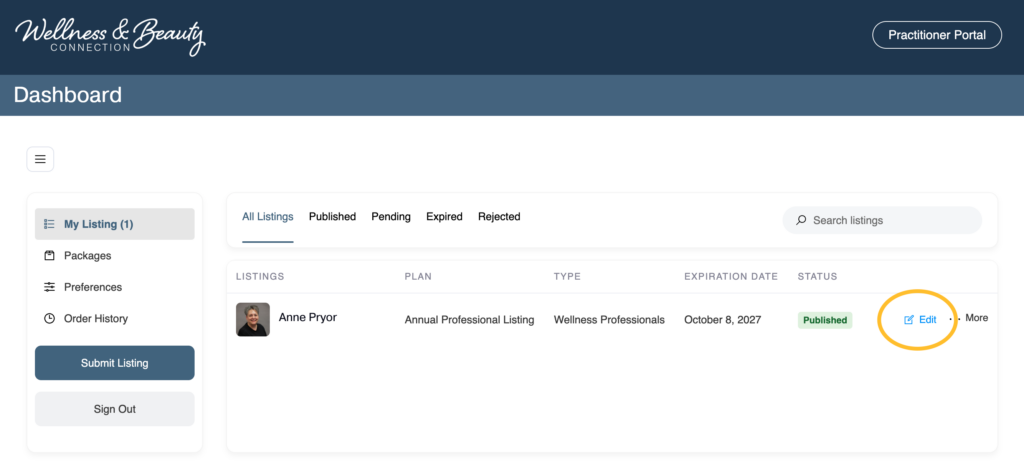
Editing My Listing
If you need to edit your online listing at anytime you can do so from your Wellness and Beauty Connection dashboard: https://wellnessandbeautyconnection.com/dashboard/
- Log in to your Wellness and Beauty Connect account here.
- Next visit your account dashboard here.
- If “My Listings” isn’t automatically chosen, click your listings from the right hand menu bar.
- Click “Edit” on the listing you would like to make changes to.
- Complete your edits and click “Preview”
- Once previewed, click “Publish” at the bottom of the page!
Alert | Image is Too Large
If your image is too large there are cases where you will not be able to upload to our directory. To resize your image quickly and easily we recommend using a website like https://www.iloveimg.com/resize-image.
- Upload your image to https://www.iloveimg.com/resize-image
- Choose the pixel width. We recommend 1200px width for our website.
- Click resize image and then download your smaller image on the next page.